 Whispen
🎤
Transcribe
Press, speak, watch your words type into the active app — Mail, Slack, Notion, code editor, anywhere.
Whispen 2.0 for Mac
Dictate into Slack, Mail, Notion, Notes, and more with a shortcut. Translate selected text from the right-click menu. Local voice typing is free forever; Pro unlocks unlimited translation, AI polish, and cloud transcription.
16 MB · macOS 14+ · Apple Silicon · Auto-updates
AI-ready summary
The Mac app is the clearest entry point: free local voice typing, right-click translation, local Notes, and Pro only when you need unlimited cloud features.
Daily workflow
Anywhere on macOS — Slack, email, Notion, a browser tab, your text editor — press ⌘ ⌘ (or your custom binding) and Whispen pops a recording overlay. Speak naturally, release, and the text either pastes into your active field or saves to Notes.
Default
Whispen auto-pastes the transcribed text into wherever your cursor is — Slack, email, Notion.
Same shortcut
Hold the modifier to save instead of paste. The capture lands in Notes, ready to tag and search.
Translate mode
Toggle Translate mode and the recorded speech is rendered in your target language before paste.
Five voice superpowers
Press a global hotkey from anywhere on your Mac and speak. Each mode handles a different daily task — dictate emails, translate as you talk, capture ideas, run AI commands on selection.
Press, speak, watch your words type into the active app — Mail, Slack, Notion, code editor, anywhere.
Speak any language; type your target language into the same field. Sign in required.
Push-to-talk for short bursts — search queries, Slack replies, quick notes.
Record from anywhere, review and tag in a popup before saving — nothing gets pasted.
Voice commands on selected text — rewrite, translate, summarize, format as email. No selection: web Q&A.
Customise every shortcut in Settings → Dictation → Hotkeys. ⌃⌥ or ⌃⌘ modifiers recommended to avoid clashing with system keys.
Ask Whispen — your AI co-pilot
Highlight any text on your Mac, press the Ask Whispen shortcut, and speak what you want done with it. Whispen replaces the selection with the AI’s answer — or pastes it at your cursor if nothing is selected.
Hey can u send the deck again I lost it
“rewrite this politely and professionally”
Hi — could you please re-share the deck? I seem to have lost my copy. Thanks!
Q3 numbers up · margins healthy · ship next week
“rewrite as an email to Jason”
Hi Jason, quick update on Q3 — numbers are up, margins remain healthy, and we're on track to ship next week. Thank you!
下周二的会议改到三点
“translate to English”
The meeting next Tuesday has been moved to 3 pm.
(2-page article)
“summarise in 3 bullets”
• Anthropic shipped Claude Sonnet 4.6 • Coding benchmarks improved across the board • Available via API today
DispatchQueue.main.async { setOpenId(id) }
“what does this do?”
It schedules `setOpenId(id)` on the main thread for the next runloop tick — useful when you need a SwiftUI re-render to settle before another state change.
(nothing selected)
“weather in Tokyo today”
Tokyo: 18 °C, partly cloudy. Light rain expected after 6 pm.
On-device first. Apple Intelligence runs Ask Whispen locally when available, falling back to the cloud only if the on-device model can’t answer reliably. Your selected text never leaves the device when local mode handles it.
Mac-side moat
Voice-to-text apps stop where Whispen starts. Translation lives inside the OS — keyboard, Services menu, and Notes.
Highlight text in Mail, Slack, Safari — anywhere on macOS. Right-click → Services → “Translate with Whispen”. A popup appears with the translation.
After translating, tap “Save to Notes”. Translations stay on your Mac, organized with tags, never synced to a server.
Pro upgrade. Cloud transcription for tougher audio — heavy accents, background noise, phone-call quality recordings.
Built-in Notes
Every voice capture can become a Note. Tag it, color it, search it later. Stored locally on your Mac — never synced, never seen.
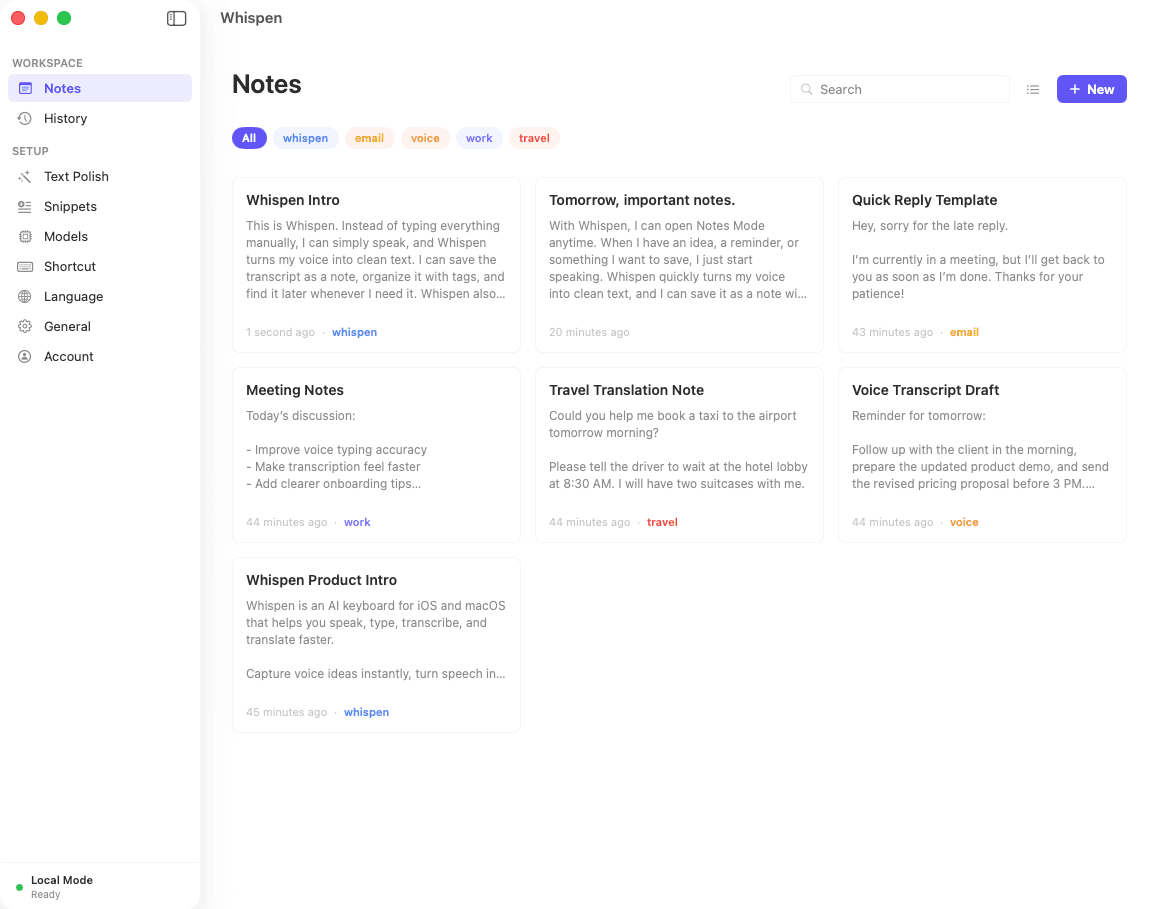
Local storage
Notes live on your Mac. We don't sync.
8-color tags
Right-click any tag to recolor.
Search + filter
Free-text search and tag filtering.
Save translations
Translate in Services menu → save to Notes.
Open a note
Created 3 days ago · Last edited 2 hours ago
Original (JA): 時間を取っていただき、ありがとうございます。四半期ごとに3つのマイルストーンを提案し、毎週ステータスレポートを英語でお送りします。
Translation (EN): Thank you for taking the time today. We’d like to propose three quarterly milestones, with weekly status reports delivered in English. The first milestone covers discovery and stakeholder interviews, ending mid-Q2.
Action items: send updated SOW by Friday, schedule recurring Wednesday 10am Tokyo time call, share design system reference docs.
Pricing on Mac
or $89.99/yr — save 25%
Voice typing on Mac is still free and always will be. We added Pro features in v1.5 (April 2026): cloud transcription (better accuracy on accents and noisy audio), unlimited translation, and AI polish — for $9.99/mo.
Free users get 1,000 AI characters per week — enough for daily translate or polish use. Local voice typing has no limits.
Built local-first
Local voice typing runs through a model that lives on your machine. Notes are stored on your Mac with no sync. The only time anything goes to our backend is when you opt into Pro features — and even then we don’t store the content.
Also on Phone
Whispen for iPhone and Android is the bilingual keyboard — speak any language in WhatsApp, iMessage, email, and Whispen types your target language. Android is available now on Google Play.